Photo → calories
Snap your plate and check the math.
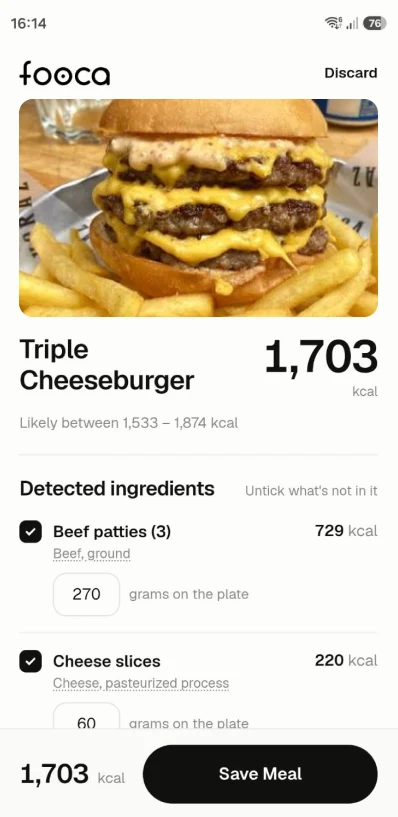
Fooca names each ingredient in the photo, with grams and the USDA row it matched. The total is a range, and it asks about the cooking oil the photo can't show.
Free, no account. Your meals stay on your phone.
- ~5s
- photo to log
- ±10%
- error margin
- USDA
- data source
How it works
Show it or say it.
A photo and a spoken description go through the same analysis: Fooca detects the ingredients, matches them to USDA data, and estimates the portions. Five seconds later you're looking at the result, with a ~ on each number it guessed.
Snap your meal
Take one photo. Fooca finds each ingredient and estimates its portion in grams.
Confirm in one tap
Each ingredient lists the USDA entry it matched. When ground beef could pass for lentils, Fooca offers both candidates and you swap them in one tap. It also asks how much oil went in the pan.
Watch the trend
Daily and weekly totals for calories, protein, carbs and fat against your goals. A day over your goal looks the same as a day under it.

Voice → meal
Say what you ate.
Tap the mic and describe the meal out loud, up to 30 seconds. What moves while you talk is the microphone's own reading — the level, the clock, the shape of what you just said — so you can see it is hearing you before you stop. Say an amount ("300 grams of rice") and Fooca logs 300 grams; leave it out and it estimates, marking the guess with a ~. Tap Finish and the take runs the same analysis a photo gets.
Faster than typing "rice, white, long-grain, cooked" into a search box.
Why Fooca
A number, and how much to trust it.
Logging a meal
One photo, ~5 seconds
Typical trackers: 3–5 min of database search
The calorie total
"Likely 610–750 kcal"
Typical trackers: one exact-looking number
Ambiguous ingredients
Both candidates, one tap to swap
Typical trackers: you search again yourself
Hidden cooking oil
Estimated, then asked about
Typical trackers: ignored
Source of each ingredient
USDA reference, on the row
Typical trackers: user-submitted entries
Your body data
Stays on your device
Typical trackers: account + profile required
"Typical trackers" means apps where you log meals by searching a food database by hand.
FAQ
Questions we get.
How accurate is it?
Photo analysis is estimation, so each meal shows a range; portions carry roughly ±10% error. When two foods look alike, Fooca shows you both candidates, and you can edit any ingredient or gram count in place. The log starts as Fooca's estimate and ends up yours.
Is it free?
Yes, ten photo scans a day and a week of history, at no cost and forever. Premium ($3.99/month) keeps every day you've logged and moves your record across devices.
What happens to my data?
Your meals, photos and profile stay in this browser, on this device. There is no account and no server database. The photo is the one thing that travels: Fooca sends it to the AI model that reads it, and keeps no copy.
Where do the numbers come from?
Fooca matches each ingredient against USDA FoodData Central and prints the matched row under the ingredient, so you can check our work.
Does it work with local food?
Set your country in Profile and Fooca reads dishes by their local names. A milanesa comes back as a milanesa.
Why does it ask about cooking oil?
Oil rarely shows up in a photo, and at about 120 kcal per tablespoon it can be the largest single item in the meal. Fooca asks so the estimate covers it.